Have you experienced your computer mouse not working after a few days of tantrums? Well, that’s unfortunate, but now you have a good reason to purchase a new one! Why not consider upgrading to a wireless mouse this time around? What do you think?
They cost too much, they are not very precise, and you don’t know if your computer “digests” them? I’m sorry, but I think you’re not very up to date on the subject.
I can guarantee you that wireless gaming mice are now extremely precise (there are also some for gaming that guarantees performance very close to those with cable), and most of them can be brought home at very affordable prices.
Of course, for the most complete and precise mice, it is necessary to shell out figures of a certain level, but not much higher than those that would be spent on the purchase of a top of the range mouse with cable.

- Compact Mouse: With a comfortable and contoured shape, this Logitech ambidextrous wireless mouse feels great in either right or...
- Durable and Reliable: This USB wireless mouse features a line-by-line scroll wheel, up to 1 year of battery life (2) thanks to a...
- Universal Compatibility: Your Logitech mouse works with your Windows PC, Mac, or laptop, so no matter what type of computer you...
- Plug and Play Simplicity: Just plug in the tiny nano USB receiver and start working in seconds with a strong, reliable connection...
- Better than touchpad: Get more done by adding M185 to your laptop; according to a recent study, laptop users who chose this mouse...


- Ultra-fast LIGHTSPEED wireless technology in this wireless mouse gives you a lag-free gaming experience, delivering incredible...
- G305 wireless computer mouse boasts an incredible 250 hours of continuous gameplay on just 1 AA battery; switch to Endurance mode...
- The durable, compact design with built-in nano receiver storage makes G305 not just a great portable desktop mouse, but also a...
- The next-generation optical HERO sensor in this gaming mouse delivers incredible performance and up to 10x the power efficiency...
- Wireless does not have to mean heavy. This gaming mouse provides high maneuverability, coming in at only 3.4 oz, thanks to an...

- COMFORTABLE DESIGN: Contoured, wireless optical mouse with 3-button navigation and integrated scroll wheel lets you be productive...
- WIRELESS CONVENIENCE: Go cordless with 2.4 GHz USB-A connectivity that keeps you connected up to a range of 30 feet; USB nano...
- MULTI-SURFACE PERFORMANCE: Be ready for anything with LED multi-surface technology that smooth, lag-free movement on virtually any...
- PRECISION CONTROL: 1600 dpi optical sensor provides reliable mouse tracking, exceptional speed, and pinpoint accuracy that can be...
- DEPENDABLE POWER: With up to 15 months of use on a 1 AA battery (3), this HP wireless mouse is designed to push the limits and...

- 【Dual Mode Wireless Bluetooth Mouse】: Switch easily between two devices—connect one via Bluetooth (BT5.2/3.0) and the other...
- 【Rechargeable Wireless Mouse】: Equipped with a 500mAh lithium-ion battery, it charges in 2 hours for over 7 days of use and...
- 【Colorful LED Breathing Light】: Features 7 colorful LED lights that change randomly, adding a fun atmosphere to your...
- 【Portable Mouse】Compact size (4.4 x 2.3 x 1.1 inches) makes it easy to fit in your laptop bag. Lightweight and ergonomic, it's...
- 【Wide Compatibility】: Works with laptops, PCs, tablets, and smartphones across various operating systems, including Android...

- 【Plug and Play for Home/Office/School】The wireless computer mouse features 2.4GHz connectivity, delivering a stable...
- 【3 Levels Adjustable DPI】This travel USB mouse offers 3 adjustable DPI settings (800, 1200, 1600), allowing you to customize...
- 【Effortless Browsing】Equipped with forward and backward buttons, this computer mice streamlines your workflow, making it easy...
- 【Visible Indicator Light】 The pc mouse features a visual indicator for DPI levels and low battery alerts. The red light...
- 【Click to Wake】With smart sleep mode, it saves power by standby after 10 inactive minutes, just 2-3 clicks to wake. This...

- Your hand can relax in comfort hour after hour with this ergonomically designed mouse. Its contoured shape with soft rubber grips...
- You’ve got the control to do more, faster. Flipping through photo albums and Web pages is a breeze, especially for...
- Two years of battery life practically eliminates the need to replace batteries. ** The On/Off switch helps conserve power, smart...
- The tiny Logitech Unifying receiver stays in your laptop. There’s no need to unplug it when you move around, so there’s less...
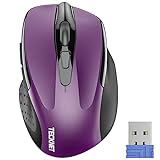
- Compact Design, Travel Friendly - With the dimension of 4.09*2.68*1.49 in, this compact mouse provides more portability and a...
- Ergonomic Design, Comfort Grip - The contoured shape of this mouse is ergonomically designed to fit the natural curve of your...
- Advanced Optical Tracking - Featuring 5-level adjustable DPI (800/1200/1600/2000/2600), this mouse provides high-performance...
- 24 Months Battery Life - Combined with a power-saving mode and on/off switch, this efficiently engineered mouse grants you up to...
- Plug and Play - Simply plug the USB-A mini-receiver into your Windows, Mac, Chrome OS, or Linux computer and enjoy seamless...

- Convenient Portable Mouse for Laptops and Tablets: The Logitech M196 Bluetooth Wireless Mouse connects in seconds with a reliable...
- Comfortable, Travel-Ready Design: This Bluetooth travel mouse is lightweight and fits in any bag; its contoured, ambidextrous...
- Works on a Variety of Surfaces: With precise line-by-line scrolling and optical tracking; the M196 Wireless Bluetooth Mouse...
- Made to Last With Recycled Plastic: The plastic parts in the M196 contain certified post-consumer recycled plastic (67% for...
- 12-Month Battery Life: Enjoy a reliable 12-month battery life (1) and auto sleep feature for longer use between battery changes...

- Quieter Click: Logitech’s SilentTouch Technology reduces over 90 percent (1) of clicking sounds — ensuring top performance...
- Crafted for Comfort: Design with naturally shaped contoured plastic grips, the M330 SILENT wireless mouse is built for...
- Long Battery Life: M330 SILENT has a 18-month battery life (2) and power saving auto-sleep mode; it allows you to focus on your...
- Advanced Optical Tracking: With a wireless range of up to 33 ft (10m)(3), this quiet computer mouse provides high-performance...
- Plug and Play: M330 SILENT comes with a USB-A receiver that’s compatible with most operating systems including Windows, macOS...

- Pair and Play: With fast, easy Bluetooth wireless technology, you’re connected in seconds to this quiet cordless mouse —no...
- Less Noise, More Focus: Silent mouse with 90% reduced click sound and the same click feel, eliminating noise and distractions for...
- Long-Lasting Battery Life: Up to 18-month battery life with an energy-efficient auto sleep feature, so you can go longer between...
- Comfortable, Travel-Friendly Design: Small enough to toss in a bag; this slim and ambidextrous portable compact mouse guides...
- Long-Range: Reliable, long-range Bluetooth wireless mouse works up to 10m/33 feet away from your computer (3)
Buyer Guide to Choose Best Wireless Mouses
Mice can have various shapes, each of which is optimized for a different type of handle. The most common handle is the one called palm grip (palm grip) in which the palm rests entirely on the surface of the mouse.
Then there is the claw grip (claw grip) in which only the fingers are placed on the mouse, without the palm, and finally, we have the fingertip grip (taken with the fingertips) in which the mouse is moved with the tip of the fingers without always keeping your hand resting on it.
Number of Keys
Most mice have three buttons: right-click, left-click, and scroll wheel (which can also be used as a button), which are often accompanied by one or two side buttons with variable functions. This configuration is fine for most uses, except for gaming, where a mouse with more keys may be more useful.
The additional mouse keys for gaming that can be associated with various functions thanks to special software to be installed on the PC. In this case, we speak of programmable keys.
Optical or Laser Sensor
The sensor is the essential part of a mouse, the one on which the accuracy and efficiency of the device depend. It can be optical or laser.
The optical one (LED) ensures greater speed of movement, has a good level of precision but does not work on surfaces that are too smooth or in glass, this is because the sensor takes “photographs” of the body on which it is located and compares them to calculate the movements to do.
The laser sensor, on the other hand, also works on smooth surfaces as it captures images with greater contrast. It guarantees a higher level of precision than the optical one but also has a greater sensitivity to the specks of dust that can be found on the desk.
Bluetooth Wireless Connection
Wireless mice can operate radio frequency via the 2.4GHz wireless network or via Bluetooth. Those based on the 2.4GHz system require the use of a small USB stick (called a dongle) and work on all computers.
Bluetooth ones do not require the use of dongles but only work on computers that support Bluetooth technology (unless you use external keys, but this would not make sense!). Generally, they have a lower autonomy than RF ones. The range may vary from mouse to mouse but is typically 10 meters.
Some wireless mice can be associated with multiple devices at the same time and allow you to switch from one device to another with the push of a button (without having to perform a new pairing each time).
Battery
The wireless mice can be powered by rechargeable batteries such as those of smartphones, which must be charged occasionally via USB cable, or by regular AA or AAA batteries. Their autonomy is variable, although in general, we always talk about weeks per charge or per battery change.
Jetech Wireless Mouse
If you are looking first and foremost at savings, take seriously this JETech wireless mouse, which has the three standard buttons (left-click, right-click and wheel), an optical sensor, and an adjustable sensitivity of 800/1200/1600 DPI. It works via a 2.4GHz network with a USB dongle to be connected to the PC. It is powered by two AA batteries (not included in the package) and has an autonomy of about six months.
The Logitech M535 is a mid-range Bluetooth mouse suitable for all common uses. It is compatible with Windows PCs, Macs, Android devices, and Chromebooks, and thanks to its optical sensor with laser precision (1000 DPI).
It works very well on all surfaces. It has a rounded shape with a rubber grip and has four buttons: right-click, left-click, navigation button, and tilting scroll. It is powered by 1 AA battery, which ensures up to 10 months of autonomy and has a range of 10 meters.
Conclusion
One of the best mid-range wireless mice is the Logitech M720 Triathlon, characterized by dimensions of 115 x 74 x 45 millimeters and weighing 135 grams, mixed with an extremely reliable 2.4 GHz Bluetooth Smart or Wireless connection. It uses a sensor with a sensitivity of 1,000 DPI and is aimed at maximum productivity.
Among the functions of this model, there is the possibility to create shortcuts with the single keys present to speed up the workflow.
As its name suggests quite easily, it is an ergonomic version of Microsoft’s Sculpt mouse. Its semi-circular shape was designed not to strain the wrist and forearm and thus prevent disturbances caused by the repetitive stress of the upper limbs.
It works via USB dongle and has a set of standard keys to which a touch strip has been added to bring up the Windows Start menu quickly. The functions of the side strip and the central wheel can be changed via software. It is powered by an AA battery and ensures up to 12 months of autonomy.
Like the standard Sculpt, it is not suitable for gaming and left-handed users and does not allow you to adjust the DPI. The sensor that animates it is always of the BlueTrack type (more precise.